
Squash: Instant Tab Reset for Focus
Overview
Squash is a Chrome extension designed to help users regain focus by quickly clearing all open browser tabs in the current window. It functions as a digital panic button, enabling users to close every tab with a single action while preserving the URLs for later recovery. This functionality is particularly useful in scenarios where distractions have accumulated, such as during deep work sessions, research marathons, or when managing multiple projects across several tabs.
The tool targets individuals seeking improved productivity and better time management, including students, remote workers, and digital creatives who rely heavily on web-based workflows. By providing a quick reset mechanism, Squash supports intentional browsing habits and reduces the cognitive load associated with tab overload. It is especially beneficial for users who struggle with procrastination or habitual multitasking.
While the developer's background is not publicly detailed, the extension operates directly within the Chrome browser environment, leveraging native extension capabilities. Its primary use case involves creating a clean slate for focused work, followed by the ability to restore previously saved URLs at a later time. This makes it a practical tool for structured work routines and digital detox moments.
Key Features & Capabilities
- Panic Button Functionality – One-click closure of all tabs in the current window, ideal for immediate distraction removal.
- URL Preservation – Automatically saves the URLs of closed tabs, allowing users to restore them later without manual re-entry.
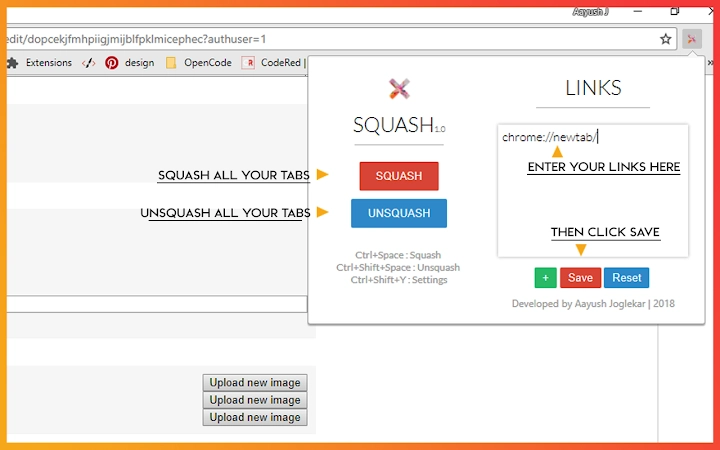
- Customizable Restore Set – Users can define a set of preferred URLs to open after tab closure, enabling quick access to essential tools or resources.
- Safe Reset Workflow – Designed to prevent accidental data loss by maintaining a backup of closed tab URLs.
- Chrome Integration – Fully compatible with the Chrome browser, using standard extension APIs for seamless operation.
For example, a student preparing for an exam might use Squash to close all research tabs, then restore only their core study resources. Similarly, a content creator could reset their workspace after a long brainstorming session to return to a focused state. The ability to define a personalized restore set ensures that users can maintain continuity in their workflow while minimizing distractions.
User Interface, Workflow & Performance
The user interface of Squash is minimal and unobtrusive, consistent with Chrome extension design standards. It operates through a small icon in the browser toolbar, which triggers the panic function when clicked. No additional menus or settings are visible within the interface, emphasizing simplicity and speed.
Workflow efficiency is high, as the entire process—closing tabs, saving URLs, and opening predefined links—occurs in a single action. The extension does not require user input during execution, reducing friction in high-stress or distraction-prone moments. Performance is based on standard Chrome extension behavior; no specific resource usage details were provided.
Stability is expected to be reliable, given that the extension uses official Chrome APIs. However, exact performance metrics such as CPU or RAM impact were not specified. Users may experience brief delays during tab restoration, depending on the number of URLs and network conditions. The developer did not specify resource usage details.
Compatibility & System Requirements
Squash is compatible with Windows, Mac, and Linux operating systems, ensuring broad accessibility across desktop environments. It is designed specifically for the Google Chrome browser and requires a current version of Chrome to function properly.
The installation size is 2.1 MB, which is minimal and typical for browser extensions. No specific hardware requirements were listed, suggesting that the extension is lightweight and suitable for most modern systems. The developer did not specify resource usage details.
Compatibility information was partially provided. While the extension runs on multiple platforms, users should ensure their Chrome browser is up to date to maintain full functionality. If shortcuts are not working, users are advised to manually enable the extension via chrome://extensions.
Pros and Cons
Pros
- Effortless tab management with a single click
- Preserves URLs for later restoration
- Supports customizable workflow recovery
- Minimal system footprint (2.1 MB)
- Free to use with no hidden costs
Cons
- Only works within the Chrome browser
- No visible interface for managing saved URLs
- Requires manual enablement if disabled by Chrome
- Dependent on Chrome’s extension policies and updates
- No built-in backup or cloud sync for saved URLs
FAQ Section
Is Squash compatible with browsers other than Chrome?
Squash is designed exclusively for the Google Chrome browser. It does not support other browsers such as Firefox, Edge, or Safari.
Can I restore my tabs after using Squash?
Yes, Squash saves the URLs of closed tabs and allows users to restore them later using the predefined set of URLs.
Is Squash safe to use?
Yes, Squash operates within Chrome’s extension security model. It does not collect or transmit user data beyond the URLs of open tabs, which are stored locally.
How do I enable Squash if it’s not working?
If the extension is not responding, go to chrome://extensions and ensure it is enabled. Chrome may disable extensions for security reasons.
Does Squash require an internet connection to function?
While Squash does not require an internet connection to close tabs or restore saved URLs, a connection is needed to access the websites when the URLs are opened.
Final Thoughts + CTA
Squash delivers a focused, no-frills solution for users overwhelmed by open tabs. Its core strength lies in its simplicity and effectiveness—closing all tabs instantly while preserving the ability to return to essential resources. It’s ideal for professionals and students aiming to improve concentration and reduce digital clutter.
Despite its limited interface and platform-specific nature, Squash excels in its niche. The absence of complex settings or data storage overhead makes it a reliable tool for quick resets. For anyone struggling with tab overload, this extension offers a practical, secure, and free way to reclaim control over their browsing environment.
Download Squash now to experience a distraction-free workflow with one click.







